


Photo by Andrew Neel on Unsplash
Problem
TBD
Solution
We want to make the desktop app behave more like a browser. thats why we want to change the titlebar to have a closer look like a browser titlebar.
The titlebar will show the name of all the paths by default
By default, the titlebar will look like an input, but with all the paths and breadcrumbs similar to what we have right now. What we will remove, is the hover interaction on each path section.
When the titlebar is focused, it will show the actual URL of the current document
when the user interacts with the titlebar, we will change the titlebar from showing the path document names to show the full URL. The user will have full freedom to edit (as a normal input.
The titlebar will act as a search bar, the same as in the browser
If the user removes the content and start typing, the titlebar will act as a search input, showing possible answers below on a anchored dialog. Here we can show recent pages visited in the past if we see is important.
Below you can see a Old design. Is not meant to look exactly like this, but at least you can get an idea of the different states and how it will look overall.
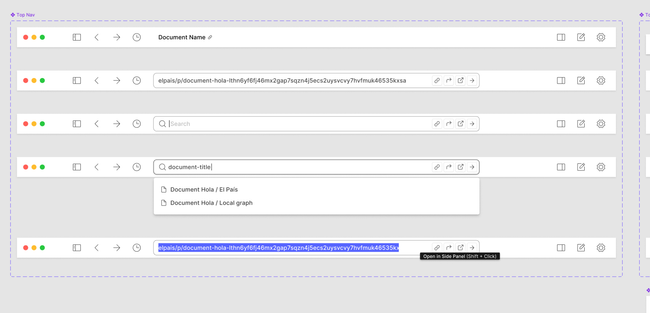
The right side of the titlebar will have actions related to the current document
Users will still have a way to copy the current link, add to bookmarks, and all the document related actions on the right side of the bar.
Scope
1-2 weeks. Depending on how complex the interactions will be.
Rabbit holes
TBD
No gos
TBD
Do you like what you are reading? Subscribe to receive updates.
Unsubscribe anytime